
How to turn images into videos using AI with open-source models, ComfyUI workflows, and private GPU infrastructure

Written by Henry Navarro
Introduction 🎯
Creating static AI images is just the beginning. What if you could take that perfectly generated AI influencer or character and bring them to life with realistic movement, gestures, and expressions?
In the previous tutorial, we explored how to create custom AI persons from scratch. Now, we’re taking that foundation to the next level by transforming those static creations into dynamic, moving content.
Unlike expensive, limited and highly censored commercial platforms like OpenAI, Gemini or Grok that limit your creativity and store your data on remote servers, we’ll be using completely open-source tools running on private GPUs. This approach gives you total control over your content pipeline while keeping costs predictable and keeps a solution to turn images into videos ai.
Recap: Deploying ComfyUI on Private GPUs 💻
If you followed the previous tutorial, you should already have ComfyUI running on your private GPU setup. For this advanced workflow where we turn images into videos AI, we’ll be using the same infrastructure but with enhanced templates and models.
The setup process remains straightforward: rent a GPU instance on Vast.ai, launch the ComfyUI application, and this time select the Qwen-Image-2509 template from the Templates section that will allow us to turn images into videos ai.
If you want to use the same GPU infrastructure I’m using in this tutorial, look for instance 37748 in the Europe region, it’s my single RTX 5090 GPU that typically runs for less than 50 cents per hour.

Once your instance is running, you’ll need to download additional models specifically for video generation. Don’t worry about the initial missing models warning, the command lines are provided in the sections below so you can simply copy, paste, and get everything installed automatically.
Advanced Image Combination with AI 🎨
The first major enhancement we’ll explore is dynamically combining multiple images to create new compositions.
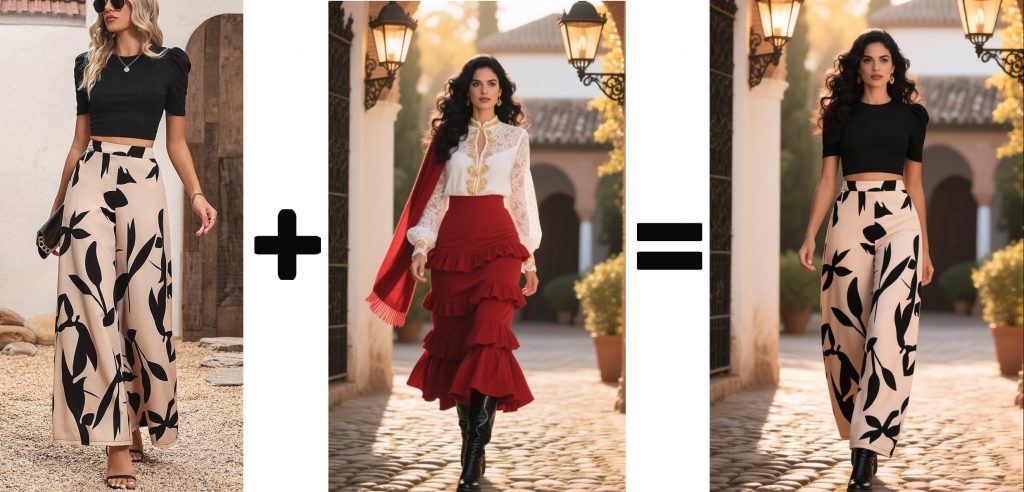
The key to successful image combination lies in the Qwen-Image-2509 multi-image input capability. Start by downloading the required models and preparing your reference images, in our use case, we are going to change the outfit of our influencer.

Commands to download the models:
# ComfyUI Image Edit

export MODELS_DIR=/workspace/ComfyUI/models

## vae
hf download Comfy-Org/Qwen-Image_ComfyUI split_files/vae/qwen_image_vae.safetensors --local-dir $MODELS_DIR/vae

## diffusion
hf download Comfy-Org/Qwen-Image-Edit_ComfyUI split_files/diffusion_models/qwen_image_edit_2509_fp8_e4m3fn.safetensors --local-dir $MODELS_DIR/diffusion_models

## text_encoders
hf download Comfy-Org/Qwen-Image_ComfyUI split_files/text_encoders/qwen_2.5_vl_7b_fp8_scaled.safetensors --local-dir $MODELS_DIR/text_encoders

## loras
hf download lightx2v/Qwen-Image-Lightning Qwen-Image-Edit-2509/Qwen-Image-Edit-2509-Lightning-4steps-V1.0-bf16.safetensors --local-dir $MODELS_DIR/loras
The prompting technique requires precision to maintain consistency while successfully combining visual elements, this will help you to turn images into videos ai. Using natural language instructions like “combine the outfit from the reference image with the woman in the main image, maintain the same face and pose” typically produces excellent results, however you can use our PrivateGPT by NeuralNet interface to improve your prompt.
Here’s the step-by-step process:
- Upload both images to the multi-image input nodes in ComfyUI
- Enter your refined prompt in the positive prompt field
- Add negative prompts to avoid unwanted artifacts like “blurry face, inconsistent lighting, mismatched skin tone”
- Set the seed value for reproducible results (use seed: 1098287103708257 to match our example)
- Execute the workflow and monitor GPU usage through the terminal

Positive prompt: Replace only the clothing of the spanish woman in the image 2 with the exact same black modern outfit as seen in the image 1. Keep everything else about the Spanish woman the same: her face, pose, hair, body shape, skin tone, and background must remain unchanged while deleting any scarf. Make sure she is wearing the black crop top and cream pants with the leaf design just like in first image. Do not change her facial features or alter her pose.
Negative prompt: Unmatched skin tone, unnatural face blending, visible artifacts, discolored or distorted face, poor lighting matching, unrealistic details, static image, low resolution, low quality, blurry textures, overexposure, distracting backgrounds, extra limbs, deformed features, extra fingers, poorly rendered hands, poorly rendered face, disfigured or unnatural body proportions, grainy image, compression artifacts, poor composition.
The results are remarkably consistent. The AI successfully transfers the outfit while maintaining facial features, lighting consistency, and natural pose.
Generating Motion: From Image to Video 🎬
Now that we’ve mastered image combination, it’s time to bring our static characters to life.
For video generation, we’ll be using Wan, an image-to-video model developed by the same Alibaba team behind Qwen-Image.

First, you’ll need to choose the right template and download the video generation models. The process is similar to the image editing setup, but requires additional components for motion processing:
## text_encoders
hf download Comfy-Org/Wan_2.1_ComfyUI_repackaged split_files/text_encoders/umt5_xxl_fp8_e4m3fn_scaled.safetensors --local-dir $MODELS_DIR/text_encoders

## vae
hf download Comfy-Org/Wan_2.2_ComfyUI_Repackaged split_files/vae/wan_2.1_vae.safetensors --local-dir

## diffusion
hf download Comfy-Org/Wan_2.2_ComfyUI_Repackaged split_files/diffusion_models/wan2.2_i2v_high_noise_14B_fp8_scaled.safetensors --local-dir $MODELS_DIR/diffusion_models
hf download Comfy-Org/Wan_2.2_ComfyUI_Repackaged split_files/diffusion_models/wan2.2_i2v_low_noise_14B_fp8_scaled.safetensors --local-dir $MODELS_DIR/diffusion_models

## loras
hf download Comfy-Org/Wan_2.2_ComfyUI_Repackaged split_files/loras/wan2.2_i2v_lightx2v_4steps_lora_v1_high_noise.safetensors --local-dir $MODELS_DIR/loras

hf download Comfy-Org/Wan_2.2_ComfyUI_Repackaged split_files/loras/wan2.2_i2v_lightx2v_4steps_lora_v1_low_noise.safetensors --local-dir $MODELS_DIR/lorasPositive prompt: A confident sun-kissed woman stands in a spanish environment, she is watching to the camera. The camera slowly draws nearer or elegantly circles around her and she blows a kiss to the camera, emphasizing her self-assured posture, natural beauty, and the vibrant, summery atmosphere. The scene highlights her empowered energy and the tranquil, scenic landscape.
Negative prompt: Over-saturated colors, overexposed lighting, static image, unclear details, subtitles, artistic filters, painting effects, grainy or faded overall look, worst quality, low quality, JPEG compression artifacts, unappealing, incomplete limbs, extra limbs, poorly drawn hands, poorly drawn face, deformed features, disfigured limbs, merged fingers, frozen frame, messy background, three legs, crowded background with many people, people walking backwards, extra hands, extra fingers
And BOOM!!!! 💥🤯 Here you have a perfect model acting as an influencer and blowing you a kiss. 😘💋🎬
All-Private AI Generation and Custom Solutions 🔐🚀
Everything we’ve accomplished today runs entirely on private infrastructure. No data leaves your control, no prompts are stored on external servers, and no creative limitations are imposed by corporate policies. This approach gives you complete freedom to experiment, iterate, and create content that truly represents your vision.
The combination of open-source models like Wan and Qwen-Image with private GPU infrastructure creates a powerful content generation pipeline. You’re paying only for compute time (often less than $0.50 per hour), while maintaining full ownership of your models, workflows, and generated content. This is the future of creative AI, private, scalable, and unrestricted.
Ready to scale this for your business? At NeuralNet Solutions, we help companies build custom AI pipelines that go beyond tutorials. Whether you need automated content generation, custom model training, or complete AI infrastructure deployment, we provide enterprise-grade solutions that maintain the same privacy and control principles.
Our expertise covers custom AI workflows, private model deployment, computer vision systems, and automated content pipelines. We work with businesses that understand the value of keeping their AI capabilities in-house rather than depending on external APIs with usage limits and data concerns.
What’s next? In Part 3, we’ll explore controlled motion generation, where your AI characters can follow reference videos for precise movements and gestures. This opens possibilities for training videos, presentations, and interactive content.
📅 Book a Free 30-Minute Consultation
Let’s discuss how custom AI generation can transform your content strategy.
👉 Schedule Here
🌐 Website: neuralnet.solutions
💼 LinkedIn: Connect with Henry
Turn images into videos AI with complete privacy and creative control. Your content, your rules, your success.
#TurnImagesIntoVideosAI #ComfyUI #AIVideoGeneration #PrivateAI #OpenSourceAI #CustomAI #AIAutomation #VideoAI #AIContent #NeuralNetSolutions