Workflow Supercharged: Integrating Open WebUI with Brave Browser for Private AI 🦾🦁🌐

Written by Henry Navarro
Introduction 🎯
Welcome back! If you’re looking to unlock the potential of AI in your daily browsing without sacrificing privacy, you’re in the right place. In this article, we’ll explore how you can integrate PrivateGPT by NeuralNet Solutions (based on Open WebUI), a ChatGPT-like, privacy-first AI interface that can be seamlessly integrated with Brave Browser, a browser renowned for its robust privacy features.
In this article, you’ll discover:
- Why Brave Browser and PrivateGPT by NeuralNet Solutions make a perfect privacy-centric combination.
- How to quickly set up and connect PrivateGPT to Brave with no technical headache.
- Tips for using your own models or third-party APIs for customized AI experiences.
- How to interact with web content contextually and securely using Brave’s built-in AI tools.
- All the benefits of working with private, local, or self-hosted AI models in your daily browser workflow.
Ready to bring practical, privacy-first artificial intelligence into your daily web experience? Let’s get started!
Brave + Leo AI Unleashed: Private Browsing Meets Smart Assistance 🦁🤖✨
Brave Browser goes beyond standard privacy features by including Leo AI, your personal assistant right inside the browser. With Leo AI, you can instantly summarize articles, translate content, and get answers directly related to the pages you visit. All of this happens with your privacy in mind.
Leo AI is just a click away, always available in the top right corner of Brave. Once activated, you can ask questions about any website, request summaries, or translate content with ease. You also have the option to select different models, including open-source ones for those who prefer transparency and extra control.

A standout feature of Leo AI is that you can use your own private models. For example, if you have PrivateGPT by NeuralNet Solutions (based on Open WebUI) or another OpenAI-compatible service, you simply add your API key in the Brave settings. With just a few clicks, your personal AI setup is ready to assist you anytime as you browse.
Setting Up OpenWebUI 🛡️🖥️
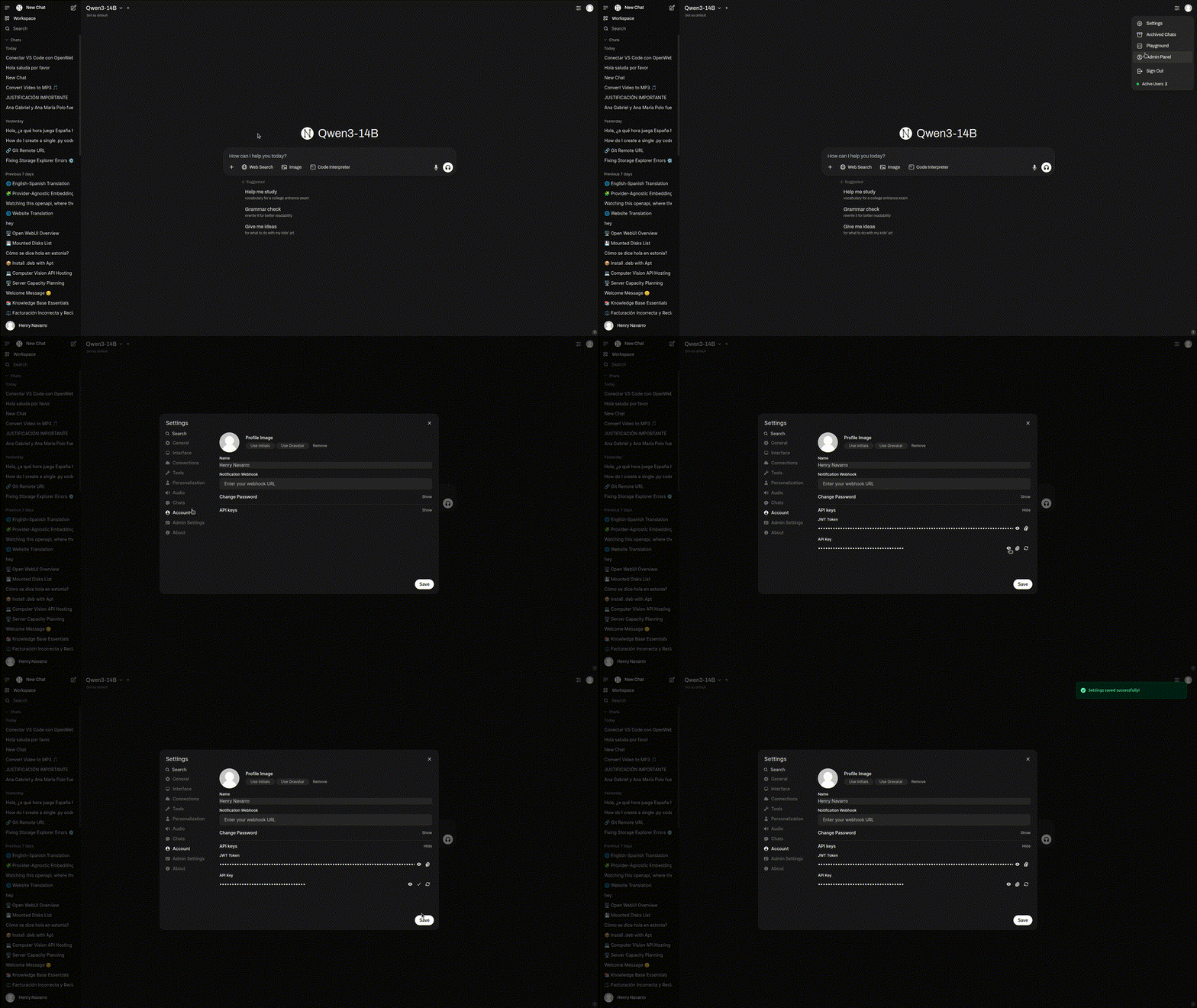
If you’d like to launch your own OpenWebUI interface, you’ll find full setup instructions in its official repo. Alternatively, you can try my free version (with some token limitations), which is pre-configured and ready to use. Just register an account and follow these steps to get your personal API key:
- Login in to the interface
- Go to your picture
- Account
- Copy your API Key
Add Your Own Model: Unlock Private, Custom AI in Brave 🎛️🤩
One of the biggest advantages of Brave’s Leo AI is how easily you can connect your own models, bringing you flexibility and full privacy. You are never limited to the defaults offered out of the box, with PrivateGPT by NeuralNet Solutions running in your setup, you can route all your Leo AI queries directly through your own private, self-hosted models.

Here’s how to link your own model using PrivateGPT by NeuralNet Solutions (based on Open WebUI):
- Open Brave Browser and head to the settings menu at the top right corner
- Select the Leo AI option in the left sidebar
- Look for “Bring your own model” and begin the integration process
- Enter the following details for your custom model:
- Name: Assign any name you like, such as “PrivateQwen” or “CustomAI”
- Model Request Name: Enter the exact model identifier you use in your Open WebUI
- Server Endpoint:
https://chat.privategpt.es/api/chat/completions - Context Size: Choose your preferred token limit (e.g., 12000 tokens)
- API Key: Copy the key from your PrivateGPT account
- System Prompt (optional): Add a custom instruction if you wish
- Vision Support (optional): Activate if your model supports image understanding
Click save to store your model, and repeat as needed for multiple entries.
Using PrivateGPT (Open WebUI) in Brave 🚀🦾
With your model now connected, it is time to experience what truly private, AI-powered browsing feels like. Interacting with PrivateGPT by NeuralNet Solutions in Brave is seamless, you get instant summaries, translations, and intelligent answers about any web content, all while your data stays secure and under your control.

Do You Want Your Own Private AI in your company? 🏢🔒
If you are looking for a truly confidential AI solution that fits your business needs, PrivateGPT by NeuralNet Solutions was built for you. Imagine having a ChatGPT-like assistant that runs 100% within your own infrastructure, guaranteeing that data never leaves your environment. This is not just about privacy, it’s about retaining full control, adaptability, and compliance, no matter your sector.
Getting started is straightforward and does not require complex implementation:
- Visit the PrivateGPT page to discover detailed features and available models.
- Book a free 30-minute consultation with the NeuralNet Solutions team, where you can explore use cases and see a live demo that matches your company’s needs.
- Choose the deployment method that fits your infrastructure, from on-premise installations to seamless integrations with your existing tools.
- Take advantage of personalized onboarding, induction, and ongoing updates to keep your solution running smoothly from day one.
With a starter plan beginning at €990 per year, you get unlimited users, quick installation, and regular updates to ensure your system is always efficient and secure.
Conclusion and Next Steps 🎯🚀
The combination of Brave Browser, Leo AI, and PrivateGPT by NeuralNet Solutions (built on Open WebUI) represents a major leap forward for anyone who values both productivity and privacy. With this setup, you are no longer limited by traditional cloud-based models or forced to compromise on data control, now you can harness advanced, ChatGPT-like features locally and on your terms.
Key takeaways:
- Supercharge your daily workflow by integrating private, intelligent assistance into every web session.
- Keep your data secure by running PrivateGPT within your own infrastructure or with trusted self-hosted options.
- Enjoy a flexible “model zoo”, making it easy to tailor the AI to your use case—coding, content, research, or support.
- Seamlessly upgrade your browser with powerful tools while keeping your intellectual property and sensitive information protected.
If you are curious about the power of PrivateGPT or looking to deploy a truly private AI solution for your team or your business, now is the perfect time to start. Try the free demo, book a consultation, or explore more on the NeuralNet Solutions website. Experience firsthand how Open WebUI technology can give you the best of AI, tailored for maximum privacy and control.
Thank you for reading, and happy browsing with your own private AI assistant! 💻🦁🤖
Happy Coding! 💻🚀
If you liked this post, you can support me here ☕😃.
Keywords: #PrivateGPT #NeuralNetSolutions #OpenWebUI #BraveBrowser #LeoAI #AIAssistant #AIBrowsing #PrivacyFirst #SelfHosted #LocalAI #DataSecurity #Productivity #TechInnovation
Originally published on Medium on July 13, 2025.