
A fair comparisson to chose the best OpenAI compatible solution

Written by Henry Navarro
And the winner is… 🏆
Welcome to the final part of our deep dive into LLM inference frameworks! In Part I and Part II, we explored Ollama and vLLM individually, understanding their architectures, features, and basic performance characteristics. Now it’s time for the decisive round: a head-to-head comparison to help you choose the right framework for your specific needs.
This comparison isn’t about declaring an absolute winner — it’s about understanding which framework excels in different scenarios. We’ll focus on:
- Resource utilization and efficiency
- Ease of deployment and maintenance
- Specific use cases and recommendations
- Security and production readiness
- Documentation
Let’s dive into the data and see what our testing reveals! 🚀

Benchmark Setup ⚡
To ensure a fair comparison, we’ll use the same hardware and model for both frameworks:
Hardware Configuration:
- GPU: NVIDIA RTX 4060 16GB Ti
- RAM: 64GB
- CPU: AMD Ryzen 7
- Storage: NVMe SSD
Model:
- Qwen2.5–14B-Instruct (4-bit quantized)
- Context length: 8192 tokens
- Batch size: 1 (single user scenario)
A very fair comparisson 📊
Let’s analyze how both frameworks manage system resources differently, focusing on their core architectural approaches and real-world implications.
Ollama:
I made an example of a single question “Tell me a story of 1000 words”. I got 25.59 tok/sec for one request. No request in parallel was done.

For requests in parallel, the user must modify the file located in /etc/systemd/system/ollama.service and add a line:
Environment="OLLAMA_NUM_PARALLEL=4"
[Unit]
Description=Ollama Service
After=network-online.target

[Service]
ExecStart=/usr/local/bin/ollama serve
User=ollama
Group=ollama
Restart=always
RestartSec=3
Environment="PATH=/home/henry/.local/bin:/usr/local/cuda/bin/:/usr/local/sbin:/usr/local/bin:/usr/sbin:/usr/bin:/sbin:/bin"
Environment="OLLAMA_HOST=0.0.0.0:11434"
Environment="OLLAMA_DEBUG=1"
Environment="OLLAMA_NUM_PARALLEL=4"
Environment="OPENAI_BASE_URL=http://0.0.0.0:11434/api"

[Install]
WantedBy=multi-user.target
And here is where I totally disliked Ollama, and I think it is not a good framework for production. Ollama reserves all the memory needed, even though only a bit of it is going to be used. I mean, with just 4 concurrent requests, it is impossible to load the full model on the GPU, and some layers are loaded on the CPU, as you can see below or by running ollama ps in your terminal.

And that’s not the worst part. What I could see is that 15% of the neural network is being loaded in the GPU, but there are almost 2GB of VRAM free in the GPU! But why does Ollama do this?
There’s an open GitHub issue that doesn’t receive any attention from Ollama developers. Several users are facing the same problem, and loading the entire neural network seems to be really hard, even when we’re talking about just 4 requests in parallel. No documentation from Ollama is provided.
Knowing this, what’s the maximum amount of context that Ollama can support to load 100% of the model in the GPU?
I tried modifying my modelfile by setting PARAMETER num_ctx 24576 (you’ll later see why this number), and I could notice the same problem occurred: 4% of the CPU was used despite almost 2GB of VRAM being free in the GPU.

vLLM:
vLLM has a pure GPU optimization approach, and as we could see in the second part of this series, the GGUF quantization is still in an experimental phase. I have to compare apples to apples, so I wanted to get the biggest context length for my GPU. After several tries, my RTX 4060 Ti supports 24576 tokens.
So I ran this modified docker (with respect to the second part of this series):
# Run the container with GPU support
docker run -it \
    --runtime nvidia \
    --gpus all \
    --network="host" \
    --ipc=host \
    -v ./models:/vllm-workspace/models \
    -v ./config:/vllm-workspace/config \
    vllm/vllm-openai:latest \
    --model models/Qwen2.5-14B-Instruct/Qwen2.5-14B-Instruct-Q4_K_M.gguf \
    --tokenizer Qwen/Qwen2.5-14B-Instruct \
    --host "0.0.0.0" \
    --port 5000 \
    --gpu-memory-utilization 1.0 \
    --served-model-name "VLLMQwen2.5-14B" \
    --max-num-batched-tokens 24576 \
    --max-num-seqs 256 \
    --max-model-len 8192 \
    --generation-config config
And I could run up to 20 requests in parallel!! That’s crazy!! For testing this framework, I used the following code:
import requests
import concurrent.futures

BASE_URL = "http://
<your_vLLM_server_ip>:5000/v1"
API_TOKEN = "sk-1234"
MODEL = "VLLMQwen2.5-14B"

def create_request_body():
    return {
        "model": MODEL,
        "messages": [
            {"role": "user", "content": "Tell me a story of 1000 words."}
        ]
    }

def make_request(request_body):
    headers = {
        "Authorization": f"Bearer {API_TOKEN}",
        "Content-Type": "application/json"
    }
    response = requests.post(f"{BASE_URL}/chat/completions", json=request_body, headers=headers, verify=False)
    return response.json()

def parallel_requests(num_requests):
    request_body = create_request_body()
    with concurrent.futures.ThreadPoolExecutor(max_workers=num_requests) as executor:
        futures = [executor.submit(make_request, request_body) for _ in range(num_requests)]
        results = [future.result() for future in concurrent.futures.as_completed(futures)]
    return results

if __name__ == "__main__":
    num_requests = 50  # Example: Set the number of parallel requests
    responses = parallel_requests(num_requests)
    for i, response in enumerate(responses):
        print(f"Response {i+1}: {response}")
And I got more than 100 tokens/sec! I can’t believe this is possible with a gaming GPU.
The percentage of GPU utilization goes to 100%, and that’s exactly what I want — to get the maximum amount of GPU (because I paid for 100% of the GPU 🤣).
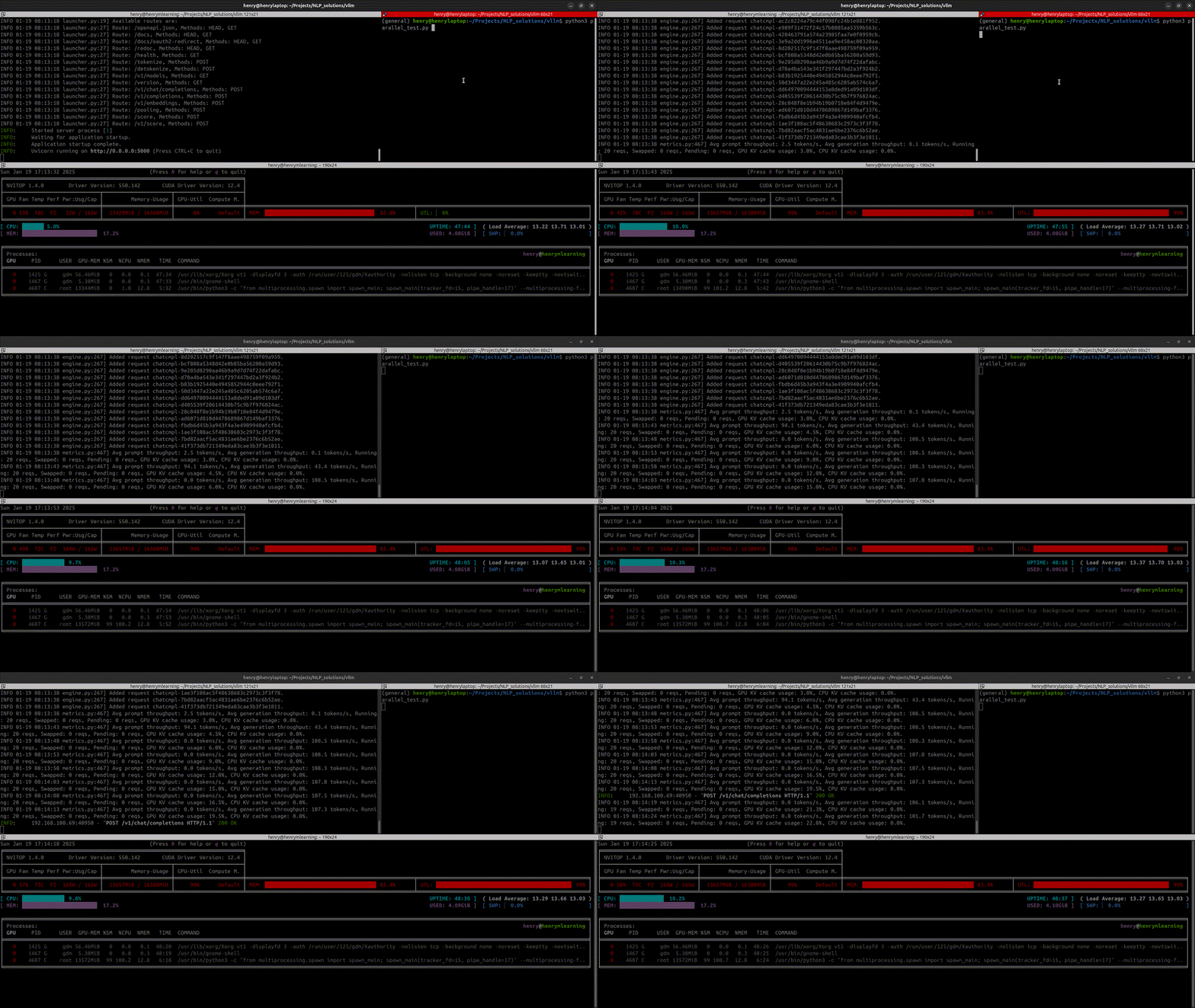
And that’s not the best part — we set --max-num-seq 256, so in theory we can send up to 256 requests in parallel! I can’t believe that; maybe I’ll try those tests later.
So here here are my final thoughts:
The final decision… ⚖️
- Performance Overview: The winner is obviously vLLM. As we saw in the second part of this article, with 1 single request, I got an 11% improvement (Ollama 26 tok/sec vs vLLM 29 tok/sec).
- Resource Management: Definitely, vLLM is the king here. I got very disappointed when I saw Ollama can’t handle many requests in parallel, and it can’t even handle 4 requests in parallel because of the inefficiency in resource management.
- Ease of Use and Development: There’s nothing easier than Ollama. Even if you are not an expert, you can quickly chat with LLMs with ease using just a single line of command. Meanwhile, vLLM requires a bit of knowledge like Docker and many more parameters.
- Production Readiness: vLLM was created for this, and even many serverless endpoint provider companies (I’ve got my sources 🤣) are using this framework for their endpoints.
- Security: vLLM supports token authorization for security purposes, meanwhile Ollama doesn’t. So anyone could access to your endpoint if you don’t secure it very well.
- Documentation: Both frameworks take different approaches. Ollama’s documentation is simple and beginner-friendly but lacks depth, especially on performance and parallel processing. Their GitHub discussions often leave key questions unanswered. Meanwhile, vLLM offers comprehensive technical documentation with detailed API references and guides, and their website is well maintained with responsive developers.
So, from my point of view the winner is… None of them!
In my opinion, if your goal is to quickly experiment with a Large Language Model in a local environment or even on remote servers without much setup hassle, Ollama is undoubtedly your go-to solution. Its simplicity and ease of use make it perfect for rapid prototyping, testing ideas, or for developers who are just starting to work with LLMs and want a gentle learning curve.
However, when we shift our focus to production environments where performance, scalability, and resource optimization are paramount, vLLM clearly shines. Its superior handling of parallel requests, efficient GPU utilization, and robust documentation make it a strong contender for serious, large-scale deployments. The framework’s ability to squeeze out maximum performance from available hardware resources is particularly impressive and could be a game-changer for companies looking to optimize their LLM infrastructure.
That being said, the decision between Ollama and vLLM should not be made in a vacuum. It must depend on your particular use case, taking into account factors such as:
- The scale of your project
- Your team’s technical expertise
- The specific performance requirements of your application
- Your development timeline and resources
- The need for customization and fine-tuning
- Long-term maintenance and support considerations
In essence, while vLLM may offer superior performance and scalability for production environments, Ollama’s simplicity could be invaluable for certain scenarios, especially in the early stages of development or for smaller-scale projects.
Ultimately, the best choice will be the one that aligns most closely with your project’s unique needs and constraints.
In some cases, you might even benefit from using both: Ollama for rapid prototyping and initial development, and vLLM when you’re ready to scale up and optimize for production.
This hybrid approach could give you the best of both worlds, allowing you to leverage the strengths of each framework at different stages of your project lifecycle.
Happy Coding! 💻🚀
Keywords: Ollama vs vLLM, Ollama API, Ollama, vLLM, Ollama AI, Ollama library, vLLM GGUF, vLLM multi GPU, vLLM API, vLLM server, vLLM inference.
Originally published on Medium on February 10, 2025.